AI-fy your Moodle, Canvas, Blackboard or Brightspace in under 3 minutes
One integration that carries a course from authoring to assessment, grading and analytics — with an AI Tutor and AI Assistant in every lesson. 30 AI tools inside the LMS you already run, connected over LTI 1.3. Free to start, no credit card.
Used by institutions across 31 countries — including MoodleMoot Ukraine 2026
Moodle Certified Integration
EduGears AI is now an official Moodle Certified Integration — our features and LTI 1.3 integration were reviewed and verified by Moodle. Install with confidence.
- Feature & integration verified by Moodle
- LTI 1.3 Advantage security compliance
- Listed on the Moodle integrations directory
Connect. Create. Teach.
Three steps from a standard LMS to a course with AI in every lesson — no migration, no new platform.
EduGears AI is a Moodle Certified Integration that connects to Moodle, Canvas, Blackboard or Brightspace over LTI 1.3 and carries a course from authoring to assessment, grading, an AI Tutor in every lesson and analytics — 30 AI tools, every one of them on the free tier.
Administrator · once · about 3 minutes
Connect
Your LMS administrator registers EduGears AI once, site-wide, over LTI 1.3 Advantage. On Moodle, an optional plugin makes it one click; a Moodle we can't reach registers manually instead.
Instructor · any course
Create
A teacher adds EduGears AI to any course through the LMS's own activity chooser, adds course documents to Curriculum Intelligence so every tool draws on your own materials, then points it at a syllabus, a PDF or existing content and gets back a structured module — lessons, quizzes, practice sets, projects. Refine anything with a plain-language instruction.
Students · no extra login
Teach
Students open the activity from inside the course with the identity they already have. The AI Tutor answers from the lesson content. Scores flow to the LMS gradebook once the instructor approves them.
Most AI tools do one thing. EduGears AI follows the course through the whole term.
Six stages, one integration — all 30 AI tools in the place they belong, inside the LMS you already run.
Start from what you already have
Import a SCORM package, a Moodle course backup or a Canvas course — or start from a syllabus. AI Course Build and the Multi-Module Builder turn it into a sequence of modules; the Lesson Planner, Slides, Study Guide, Worksheet and Page generators fill them out; Enhance with AI improves any piece on your instruction; the Module Player delivers the result as a guided learning path. Throughout, Curriculum Intelligence grounds everything in your institution's own materials — your curriculum, not the internet's.
Assess the way you already teach
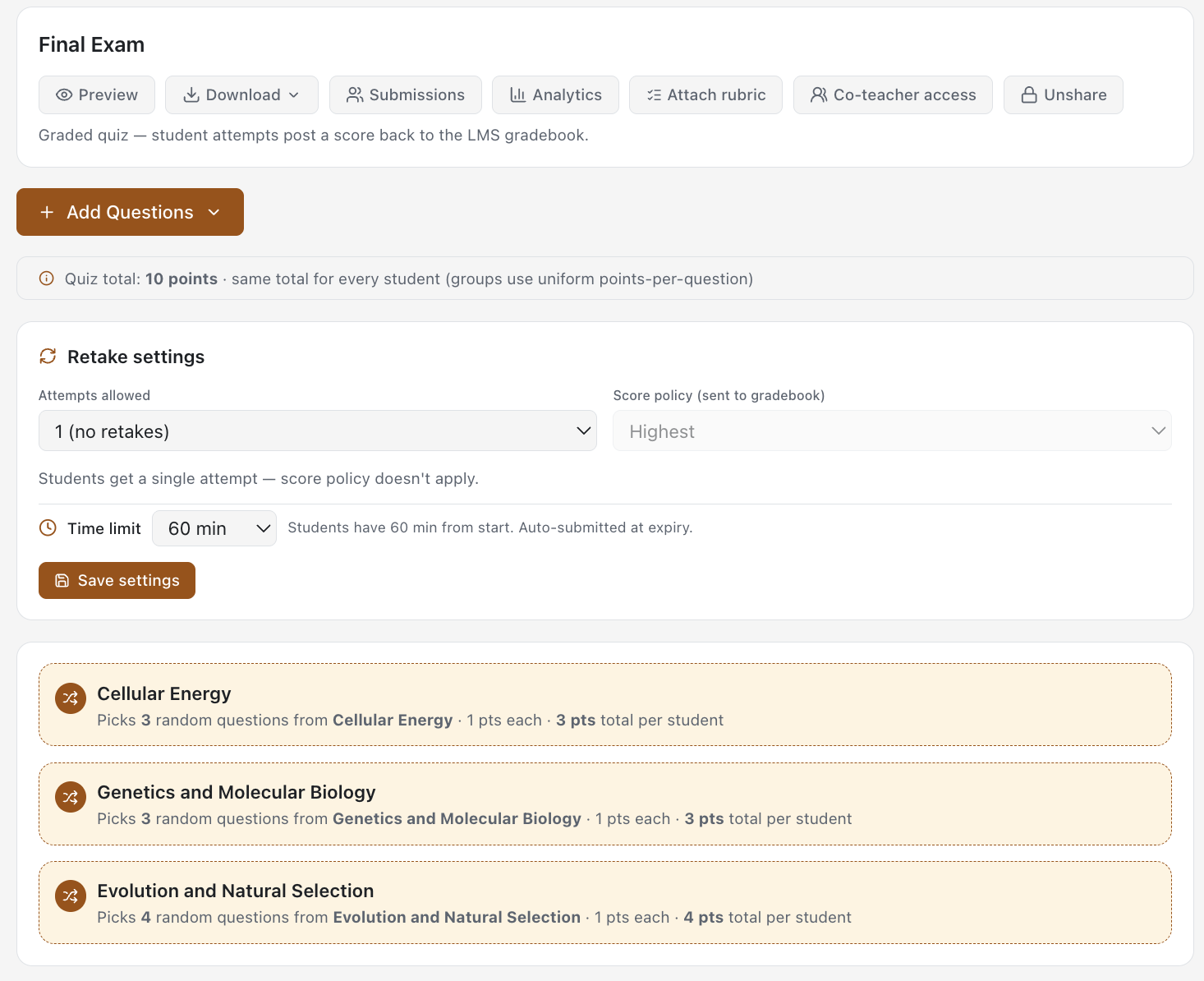
Quizzes, the AI Question Generator, Question Banks and Practice Sets cover the routine — with open, due and close dates that travel to the gradebook. A Diagnostic Pre-Check shows where learners stand before you teach; it feeds the analytics, not the grade. Capstone Projects and Project Work handle authentic, file-based work against your rubric, and Reflections add ungraded prompts with a supportive AI note back to the student.
Mark in minutes, approve in one click
AI Grading marks written, short-answer and handwritten work — handwriting in more than ten languages — against rubrics you wrote. No score reaches the gradebook until you approve it; then it posts through LTI Assignment and Grade Services. The human stays in the loop by design, not as an afterthought.
Learn more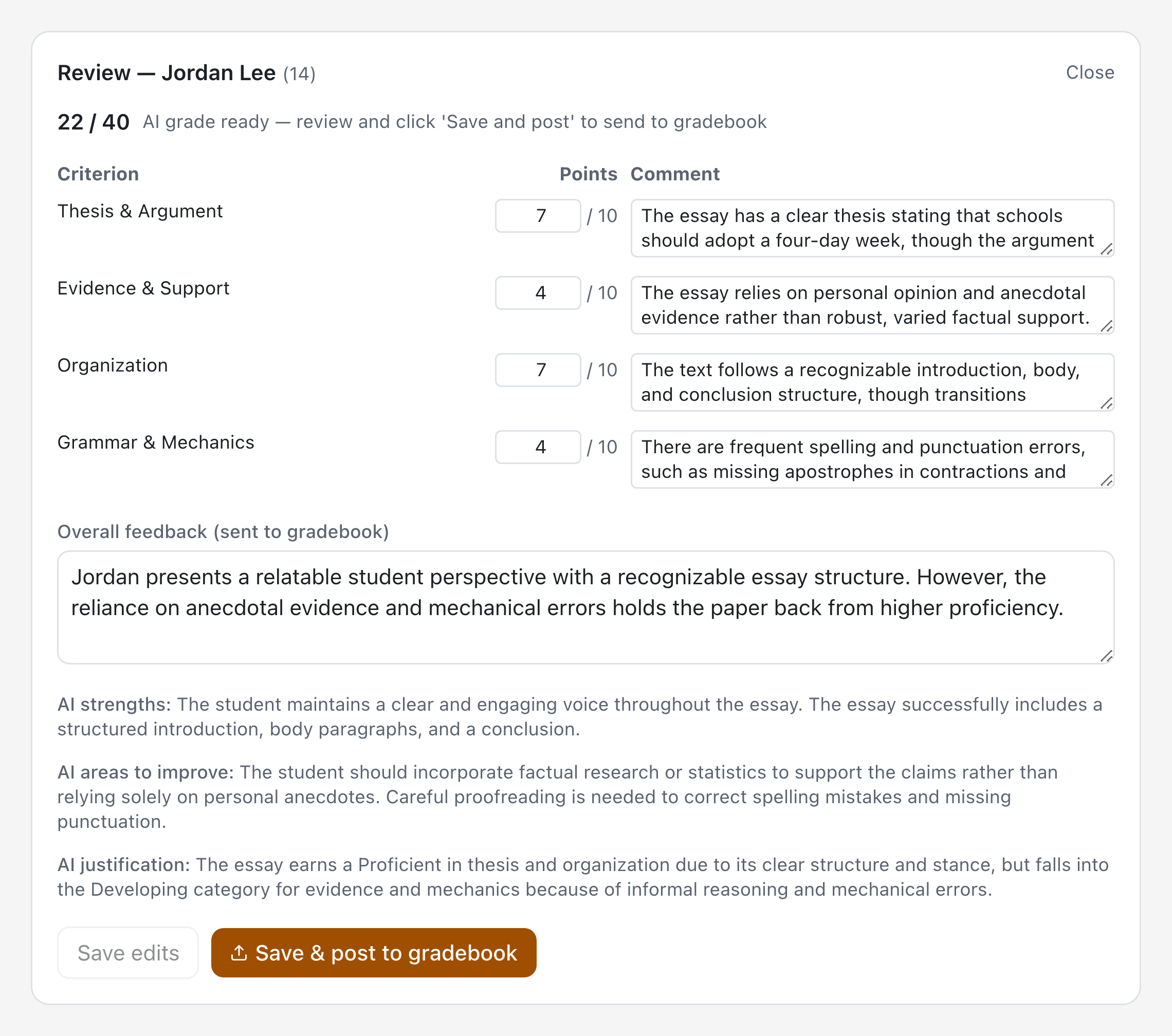
Meet Cog — AI Tutor, AI Assistant and AI Agent on every page
Both live in Cog, the EduGears AI assistant surface: one Ask Cog bubble in the corner of every page that already knows the lesson, resource or question you have open, so nobody has to explain what they are looking at. Students get the AI Tutor, answering from the actual lesson content — your material, not the open internet — with a thread per context they can leave and come back to. You get the AI Assistant for grounded help while you author, plus one toggle that shows you exactly what a learner would be told. Neither will surface quiz or answer-key material, so they are safe to leave on during assessment. Students get help at 11pm without you being awake for it. Cog is also an agent: ask it about your class and it opens your own course reports, reads what is actually there, and answers with sources — read-only, always within the permissions your LMS grants you.
Learn more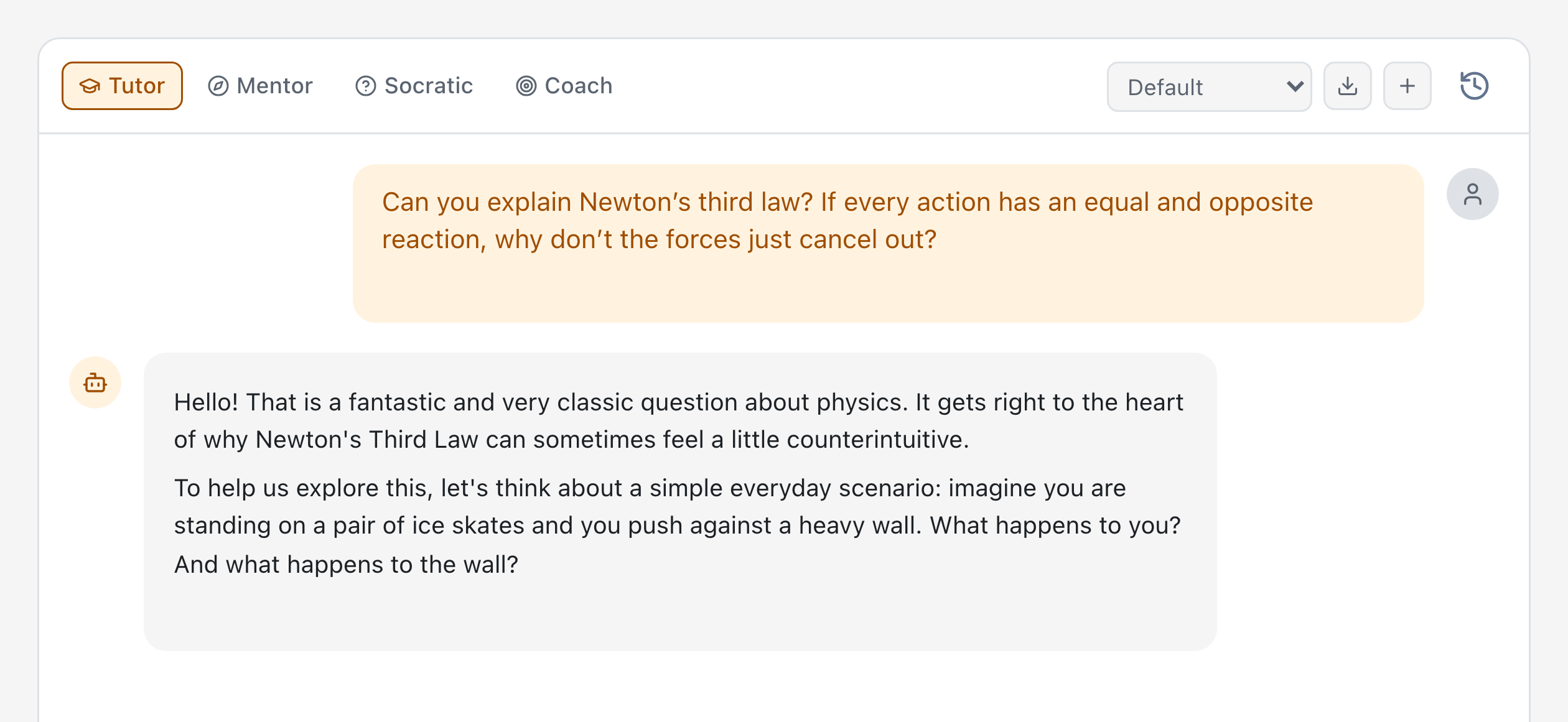
See what actually worked
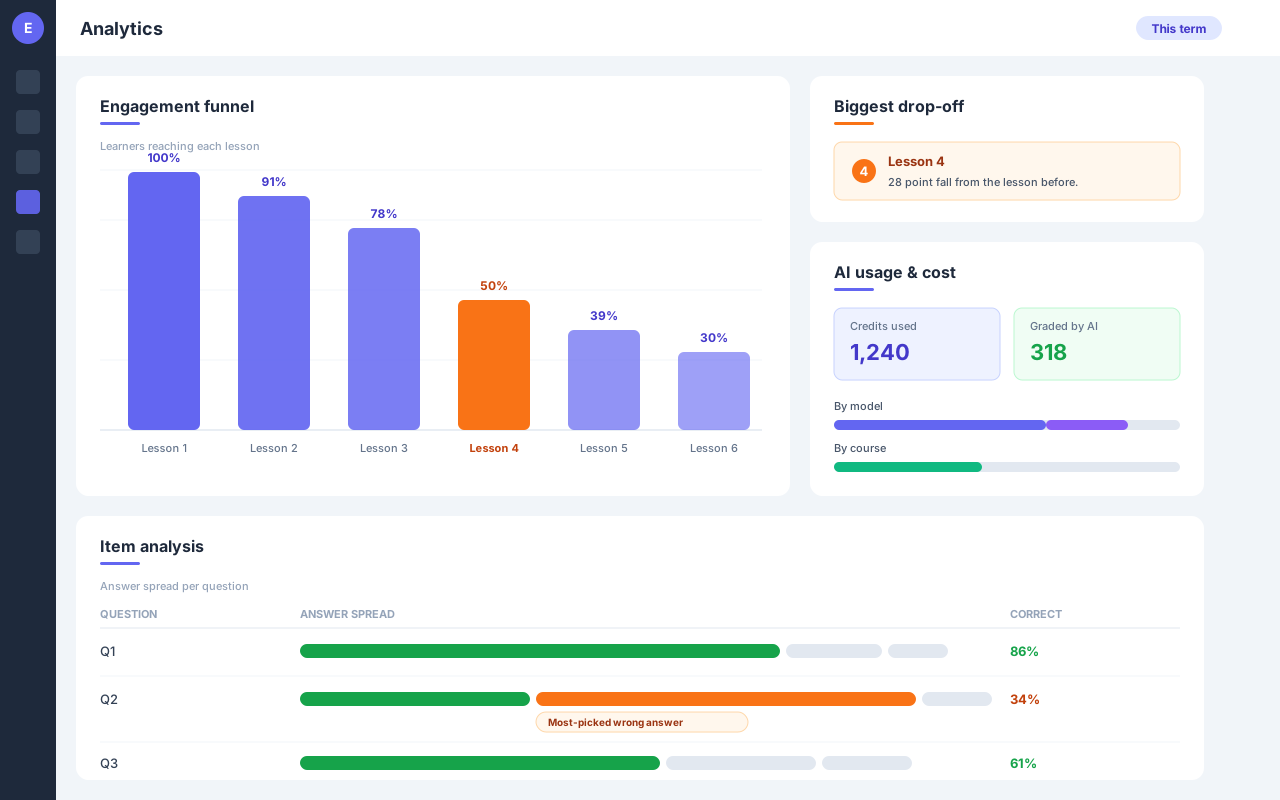
A lesson-by-lesson engagement funnel shows where learners stall. Quiz item analysis surfaces the wrong answer the class keeps picking, so the next lesson targets the real misconception. Grading reports and AI-usage reports close the loop for instructors and administrators.
Take it with you
Export a module or a whole course as SCORM 1.2, SCORM 2004 or Common Cartridge 1.3 at any time, and question sets to QTI 2.1 or Moodle XML. Content built with EduGears AI is portable — that is the point of building on open standards.
Learn more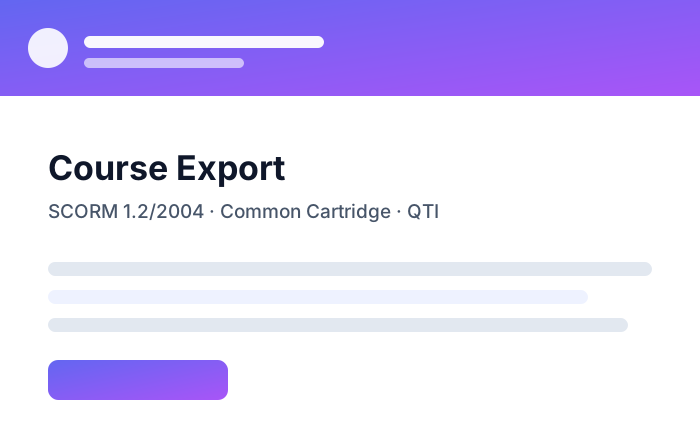
Every tool above is one of the 30 included on every plan, including the free tier.
Cog is now an agent — ask it about your class
Ask in plain words, inside your own course: “How did the class do on the Module 2 quiz?” Cog opens your own reports, answers with the real numbers, and shows you which report they came from.
- Reads the reports your LMS integration already shows you
- Sees only the courses you teach
- Read-only — it never changes anything
Connect your own Claude, ChatGPT or Copilot
Ask the assistant your institution already licenses for a quiz or a module. It lands in your EduGears AI library for Moodle or Canvas, hidden from students until you place it in a course.
- Quizzes, modules and lesson pages, written straight into your library
- Cannot see student work, grades or gradebooks
- About two minutes to set up — no API keys
Four design principles
The rules every one of the 30 tools follows.
Open standards, no lock-in
LTI 1.3 Advantage in; SCORM and Common Cartridge out. Grades, roles and enrolments stay in your LMS.
Your curriculum, not the internet's
Generation and tutoring are grounded in your institution's own materials.
Human in the loop
The educator creates, the educator approves, the AI does the tedious part.
Your data, your provider
Each institution's data is kept separate and is never used to train models. We run a managed default; bring your own key for any of these:
Bring your own key
Works With Your LMS
Connect via LTI 1.3 Advantage — no intrusive plugins, no custom code required

Moodle
Open-source LMS used by 300M+ users worldwide. Works with self-hosted Moodle and Moodle Cloud — one-click plugin registration on Premium, universal LTI URL on Starter.
Get Moodle Plugin

Blackboard
Enterprise LMS for higher education

Brightspace
D2L's cloud-first learning platform
Rare in the LTI world
Full Canvas Blueprint (BP) sync — content and analytics flow from the master course to every linked child section automatically.
A simple, predictable model
No feature held back on any plan. Learners are always free.
Free to start
200 AI credits to evaluate every tool. No credit card required.
$1.67 per educator per month, billed annually
One plan: $19.99 per educator per year. Each Educator Seat comes with 100 AI credits to start; after that, AI runs on credit packs or your own key. Add seats anytime.
Your AI, your key, your data agreement
Connect your OpenAI, Claude, Gemini, DeepSeek or Sarvam AI key and AI runs on your own provider account and terms — with the platform from $1.67 per educator per month, billed annually ($19.99/year).
Used by universities, schools and training providers in 31 countries
Across Europe, Asia, Africa, Latin America, the Caribbean and North America — almost entirely self-serve, with no paid marketing. Used at MoodleMoot Ukraine 2026, where attendees were offered free credits. One university college in Asia found EduGears AI on its own, registered, launched it inside its Moodle and generated a complete AI lesson set within 90 minutes — unassisted.
EduGears AI is a Silicon Valley company and a Moodle Certified Integration Partner.
During COVID my son was in 5th grade and kept asking me for more maths practice questions, and I could not find good free ones anywhere — so I wrote a generator for him. When generative AI arrived I went all in on one idea: give this to the teacher, not to the child. Everything in EduGears AI still starts from that — the educator creates, the educator approves, and the AI does the tedious part.
Frequently Asked Questions
Everything you need to know about EduGears AI LTI
LTI (Learning Tools Interoperability) 1.3 is the latest industry standard for securely connecting external tools to your LMS. It uses OAuth 2.0 and JWT tokens for authentication, meaning your users never share passwords with third-party tools. EduGears AI LTI uses LTI 1.3 Advantage, which includes deep linking, grade passback, and names & roles provisioning.
EduGears AI LTI works with any LMS that supports LTI 1.3 Advantage, including Moodle (4.0+), Canvas, Blackboard, and Brightspace (D2L). Setup takes about 3 minutes. Optional plugins are available for Moodle and Canvas for enhanced integration.
Yes — we already have customers running EduGears AI on their own in-house LMS platforms. If your team has built an LMS with a standards-compliant LTI 1.3 Advantage implementation, EduGears AI connects to it exactly like any commercial LMS, with no plugin or custom code required. You register EduGears AI as an external tool using your platform's client ID, deployment ID, and public keyset, and deep linking, automatic grade passback (AGS), and names & roles (NRPS) all work over the standard LTI endpoints.
Yes — fully. EduGears AI detects Canvas Blueprint master and child courses automatically on LTI launch. Question banks, rubrics, quizzes, and other content authored in the master course propagate to every linked child section, and master instructors get per-section analytics across all child courses on the same content. Child-course instructors see master content as read-only so it can't be accidentally edited. This is rare in the LTI world — most tools treat each Canvas course in isolation.
See how Blueprint sync works →Yes! EduGears AI LTI is free to get started — no seat limit, unlimited free learners, all 30 AI tools, and 200 AI credits to evaluate them, with no credit card. When you're ready to roll out, the Educator Seat is $1.67 per educator per month, billed annually ($19.99/year), with 100 AI credits per seat to start; after that, AI runs on AI credit packs or your own API key. AI video generation needs the Educator Seat or your own key. The free plan is for schools and organizations: educators need an email address on the institution's own domain, and free platforms we can't verify are deactivated automatically.
See plans & pricing →Every AI task draws AI credits, on every plan, at the same cost. The free plan's 200 AI credits cover everything you try; each Educator Seat ($1.67 per educator per month, billed annually at $19.99/year) comes with 100 AI credits to start, once. After that, top up with AI credit packs ($10 for 1,000 credits, and they never expire) or connect your own OpenAI / Claude / Gemini / DeepSeek / Sarvam key with Bring Your Own Key — free, billed at the provider's rate. Costs: 1 credit per chat turn or AI-graded question, 3 per text generation (lesson plan, slides, study guide, worksheet, or a question set of up to 5) or Reflections class summary, 10 per graded file or project submission or AI-generated image, 20 per graded audio or video submission, and 100 per AI-generated video clip (flat, whatever its length; nothing is charged if a clip fails). AI video generation needs the Educator Seat or your own key.
Read the full pricing FAQ →Most institutions complete the full setup in under 3 minutes. You register the tool in your LMS admin panel, configure the LTI keys, and you're ready to go. Instructors can then add AI tools to any course with just a few clicks.
No intrusive plugins or custom code are required. EduGears AI LTI uses the LTI 1.3 standard built into all major LMS platforms. Optional lightweight plugins are available for Moodle (marketplace.moodle.com/plugins/3620) and Canvas (EduAppCenter) for streamlined setup, but everything works through your LMS's existing external tool configuration.
Absolutely. We are FERPA and COPPA compliant. All data is encrypted in transit and at rest. We only receive the minimal information needed for authentication (name, email, course context) through LTI claims. We never store LMS credentials, and student content is never used to train AI models.
Yes. Through LTI Assignment and Grade Services (AGS), grades from AI-graded assessments are automatically posted back to your LMS gradebook. This works seamlessly with Moodle, Canvas, Blackboard, and Brightspace.
Cog is the EduGears AI assistant surface — one chat reached from every page instead of separate AI Tutor and AI Assistant pages. Click Ask Cog in the corner and it already knows what you have open: a chip names the lesson, resource or question the conversation is about, and you can widen it to the module, the course, or anything at all. Instructors open on the AI Assistant and can toggle to the AI Tutor to see exactly what a learner would be told; learners get the tutor only. It will not surface quiz or answer-key material, so it is safe to leave on during assessment — and it is already switched on for every institution, on every plan including Free.
Read the Cog announcement →Yes. Every graded quiz can carry its own Opens, Due and Closes times, set in the quiz editor in your own time zone. Students can't start an attempt before it opens or after it closes — the Start button isn't even shown — while an attempt already under way can always be finished. A due date never blocks anyone: work submitted after it is badged "Submitted late" for the student and noted in the gradebook comment. If your LMS sends its own dates for the activity, those replace the settings here.
Yes — that is what a section panel is for. Pick the questions it covers and write the panel once: it takes no number, carries no marks, and never affects a score. It opens in full above the first question in the run, and every later question in that run shows a one-line control instead, so a student on question fourteen can re-read the passage without scrolling back. Quizzes imported from Moodle or Canvas bring their panels with them — Moodle calls them description items and Canvas calls them text-only questions — and exporting as a Moodle backup writes them back out the same way.
No. Files live in a Media Library and your lessons, questions and activities only point at them, so replacing the file updates every place it is used without editing or re-saving anything. Each file keeps a permanent link that renaming never moves, a version history you can roll back with Make current, and a Used in list — and the confirmation names every place a file is used before the swap happens. You never have to visit the Library to fill it: uploading inside an editor, a question, or an attachments activity puts the file there for you. Video and audio play inline and PDFs display in the page.
Your content belongs to you. All generated questions, slides, study guides, and other materials are saved to your course and persist across sessions. You retain full ownership and can export everything as PDF or QTI. We do not use your content to train AI models.
Yes! Teachers can share any AI-generated content directly with students through their LMS. For quizzes and worksheets, answers are automatically hidden from students so they can complete the activities without seeing the solutions. Teachers retain full control over when and how answers are revealed.
Ready to Add AI to Your LMS?
Get started in under 3 minutes. No credit card required. No intrusive plugins. Just connect and go.